Square Online · Editor, Activation, and seller experience
Making design intent survive real use.
At Square, my responsibility grew from testing individual features to leading quality across Square Online’s Editor and Activation experiences. That put me at the intersection of visual expression, seller workflows, and the decisions that made releases ready. Working across typography, imagery, customization, ordering, and activation taught me to connect the way a product looks with the way it behaves. Today, that perspective shapes my product design practice and my work training AI models on design best practices at Mercor.
Company
Block
Product
Square Online, Square Photo Studio, Square POS, Weebly, Square Kiosk
Contribution
Quality leadership, end user advocacy and product judgment
Collaboration
Product design and engineering


I owned quality planning, risk assessment, triage, and readiness within the ecommerce stable, working with customer success, product designers, product managers and engineers responsible for design and implementation.
Visual craft
Preserving hierarchy through type and imagery.
Interaction quality
Making controls and their effects understandable.
Product judgment
Balancing usability, adoption, and disruption to an existing business.
QA analyst → product specialist and quality lead → product designer and AI trainer
My work shifted from individual findings to connected systems, then toward shaping intent itself.

02 · EDITOR EXPERIENCE AND VISUAL QUALITY
From a starting theme to a seller’s own storefront.
Themes provided the foundation, but sellers still needed to make the site their own. This mattered especially for those choosing the basic black and white theme: their store and menu information carried over, while colors, imagery, and supporting assets still needed attention in the editor.
Across Square Online’s Editor and Activation teams, my quality work connected these customization tools to the seller’s next task. Could they find the right control, understand what it changed, and trust the result across their published site?
My responsibility
I owned quality planning, risk assessment, issue reporting, and release readiness within my remit. Working with designers and engineers, I evaluated how visual decisions behaved across content, devices, and connected seller journeys.
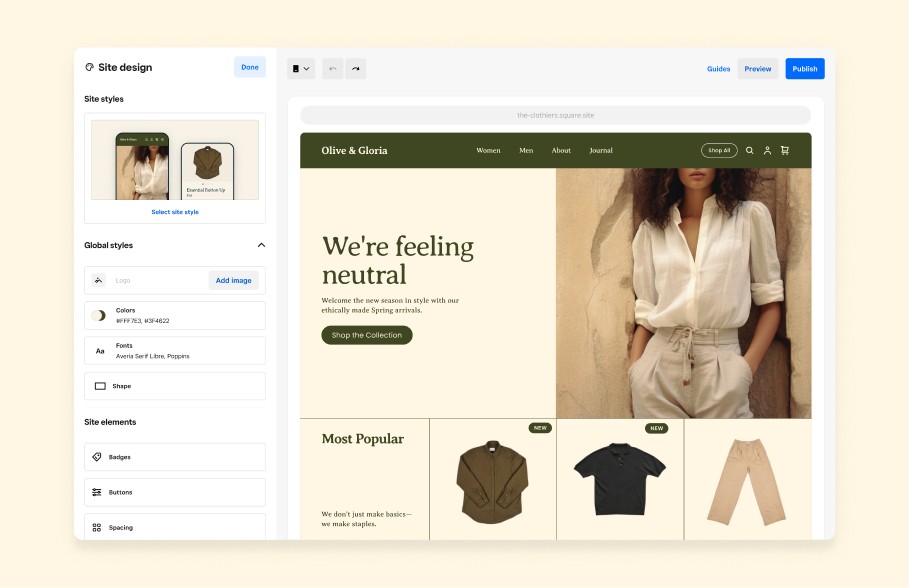
Editor image caption
The editor brings site structure, styling controls, and storefront preview into one workspace. My focus was the relationship between the control a seller used and the experience their customer received.
01 Typography and wrapping
02 Global colour scope and local overrides
03 Recognizable icons and status meaning
04 Banner crop, composition, and action visibility
Editor interface
The controls, navigation, feedback, and publishing model a seller uses.
Seller website styles
The type, colour, imagery, icons, and layouts customers ultimately see.
Shared implementation rules
The behaviour that keeps a control, preview, and published result in agreement.
Navigation should make scope visible. Sellers must understand system intent immediately
The seller needs to understand where they are, what will change, and when customers will see the result. The model below is conceptual rather than a record of exact historical menu labels. Moving part of onboarding into the editor also made palette and asset discovery part of successfully getting started.
Site
Which property am I editing?
Page
Where will it appear?
Section
What region is selected?
Local controls
What changes here?
Global styles
What changes everywhere?
Preview
What will customers see?
Publish
When does it become live?
Site
Which property am I editing?
Page
Where will it appear?
Section
What region is selected?
Local controls
What changes here?
Global styles
What changes everywhere?
Preview
What will customers see?
Publish
When does it become live?
How we maintained standards for design and engineering
How we maintained standards for design and engineering
CTA shape, colour, and action clarity
Publish site
Optical weight, contrast, and shape need to preserve a clear action across different backgrounds and nearby controls.
Storefront icon styles and recognition


The storefront reference concerns style choice and recognition. It does not establish that all editor navigation icons were redesigned.
Video banner states
Uploading
Processing
Ready
Failed
Review contrast across moving frames, crop, poster fallback, playback controls, reduced motion, loading performance, and plan eligibility.
Aspect ratio and subject preservation

The useful crop keeps the subject recognizable at every surface, rather than preserving a ratio at the expense of meaning.
An item’s status should agree with what the customer wants to do.
Item sale and availability information belongs in badges or status labels. A banner communicates a page or campaign message. Regular items do not need a decorative badge.
SALE
Ceramic cup
CA$24
Available colours: white and blue.
Add to order
Learning
A shared component is complete when its rules survive the conditions of real use.
03 · Visual commerce
Brand expression had to survive the path to purchase.
Photo Studio supports Square’s omnichannel experience through consistent product imagery that strengthens recognition and purchase confidence.
My quality approach would align design, engineering, analytics, and customer success around seller needs, expected behavior, and launch risks.
Testing would prioritize usability, accessibility, compatibility, and recovery across capture, editing, and saving.
Launch KPIs would track completion, time to usable imagery, successful saves, adoption, and support volume against agreed baselines and targets.

01 Reduce product photography costs
02 Standardize imagery across catalogs
03 Reduce purchase decision friction
04 Convert traffic into revenue
The Photo Studio app flow
Browse →
Choose item →
choose imagery →
Edit imagery →
Configure →
Add to catalogue→
Publish
Learning
Promotional emphasis and availability are separate dimensions. A trustworthy component keeps both aligned with what the customer can actually do.
04 · Themes I - THE PROJECT THAT DEFINED MY TIME AY SQUARE as a DRI
We developed a completely new way for sellers to onboard, monitor sales, edit and publish their sites
We developed a completely new way for sellers to onboard, monitor sales, edit and publish their sites
This process required two mass migrations in two years. We migrated 1 million users from Weebly to SQ Online and then a year later, migrated 3 million Square users to the new Themes system
Before general availability, we tested Themes with 1,000 users. During onboarding, we saw drop off as sellers worried that they would have to pay too much and felt they had little choice. In the initial experience, not choosing a premade theme sent them to the free plan. That exposed a mismatch between the choices the product technically offered and the choices sellers understood. We needed a way for sellers to continue with their business information intact, while deciding how much design help they wanted.
1,000
Initial feature flag test: Released Themes to 1,000 selected users to validate the experience and identify onboarding friction.
250,000
Public beta: Expanded Themes to 250,000 users to gather broader feedback and refine the experience ahead of general availability.
Public beta: Expanded Themes to 250,000 users to gather broader feedback and refine the experience ahead of general availability.
3 million
General availability: Rolled out Themes to 3 million users, making the experience broadly accessible across Square Online.
Initial journey mandatory migration
Theme selection
Choose a premade theme - Continue with updated UXUI, pricing and functionality
No premade theme selected
Free plan fallback - Blank theme with migrated content for 1 month
Key challenges in maintaining seller confidence, business continuity, and choice throughout the Themes migration.
Seller confidence
Can sellers adopt a new theme with confidence, knowing how it affects their existing content, brand identity, and familiar workflows?
Business value
Does the theme address a meaningful business need, with capabilities that help sellers improve their storefront and support growth?
Readiness to commit
Can sellers explore the experience and understand pricing before committing, without feeling pressured to upgrade or losing functionality they rely on?
Learning
An available fallback is not the same as a choice users understand.
05 · Themes II
Preserve the business & introduce the seller to their updated brand
We enabled a basic grey scale theme with the seller’s store and menu information migrated. Sellers could continue into the editor and create their own colour palette and supporting assets instead of selecting a premade visual treatment. Magic Mirror gave sellers live previews of their sites on mobile, tablet, and web before theme selection. Together, these initiatives made the choice more tangible: sellers could understand the result, retain their business information, and decide how to shape the brand.
Choose basic theme → Retain store and menu information → Customize palette and assets in the editor → Plan start checkpoint
NORTH STAR COPY
Hero items
Footers, FAQ and fullfillment details
01 - Business information retained
02 - Menu structure retained
03 - Brand styling still to be shaped
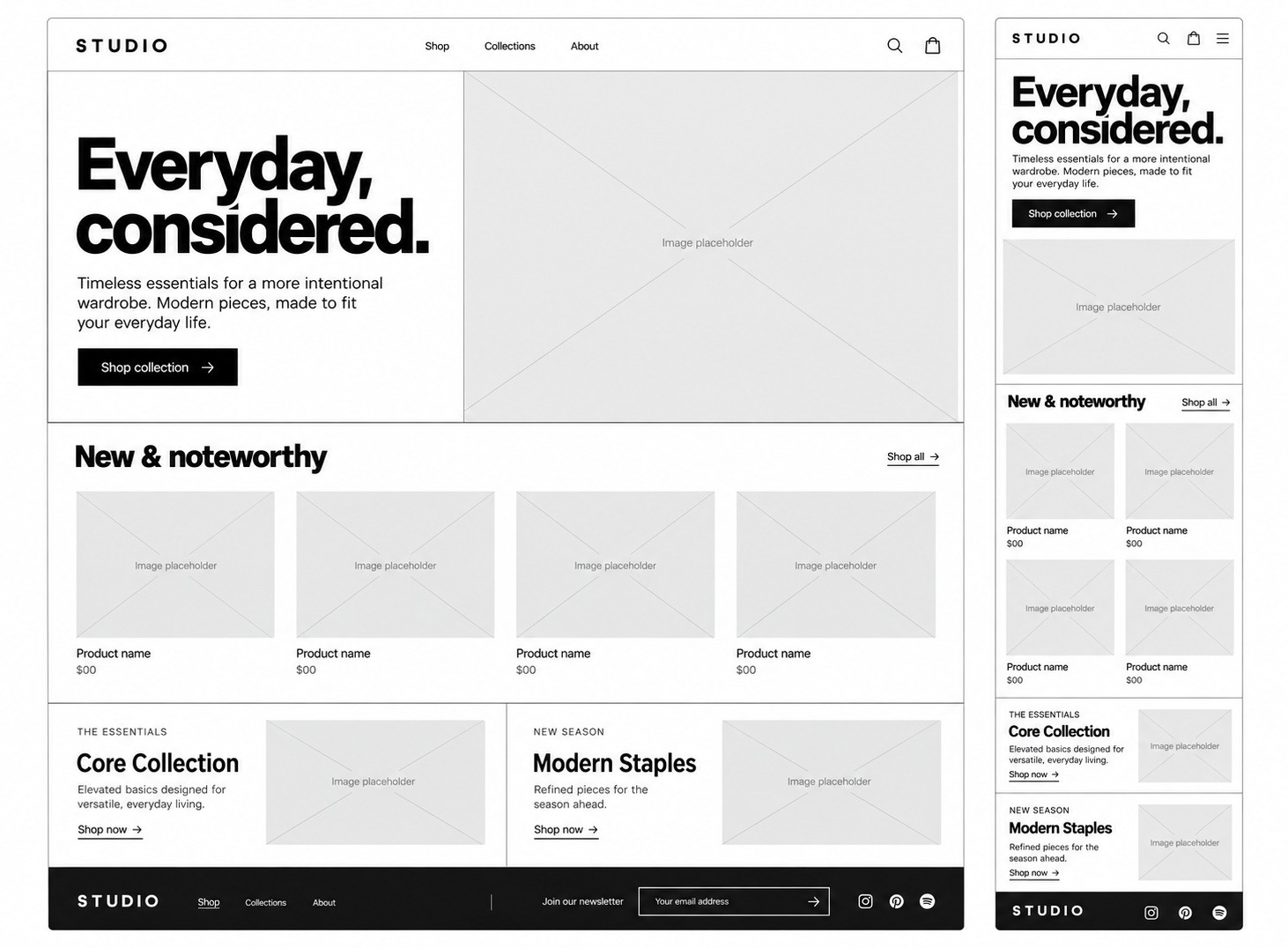
Magic Mirror made the result tangible before selection.
It helped sellers evaluate their own site rather than acting as a QA-only device switch. Wrapping, crop, density, navigation, and preview fidelity all shape whether the preview earns trust.

Learning
A preview earns trust when it answers the seller’s questions about their own site before commitment.
06 · Themes III
Make value clear. Keep the commitment explicit.
Square Online dashboard prompts surfaced Themes, while bundled upgrades packaged capabilities into a single offer. Those commercial moments needed to agree with the preview, the editor, and the plan’s actual entitlements. My quality role connected the seller journey to implementation and release readiness across Editor, Activation, Growth, product, and engineering. The rollout progressed from the initial 1,000 user test to general availability, with the onboarding learning informing the basic theme path before GA.
Dashboard offer anatomy
Benefit → eligibility → destination → included capabilities → existing access
Exploration must remain visibly distinct from purchase. The prompt should explain why the offer is relevant without implying a charge.
Bundled upgrade anatomy
Included capabilities → billing basis → confirmation → resulting entitlement
The visual promise, the purchase checkpoint, and the entitlement after confirmation need to agree.
My Launch readiness matrix
Visual integrity
Does the published result preserve design intent?
Migrated content
Does business information remain complete and correct?
Preview parity
Does preview match the selected theme across viewports?
Commercial consistency
Do the offer, confirmation, and entitlement agree?
Release readiness
Are critical risks owned, observable, and reversible?
Supported outcome
The work progressed from the initial 1,000 user test to general availability of 3 million.
Learning
Pricing and plan choices shape user behaviour. Sellers need to understand the value, cost, and flexibility of their options before they feel confident committing.
Leadership and stakeholder relationships
Addressed pricing anxiety through onboarding improvements
Led risk assessments and release readiness
Coordinated external contractors and stakeholder updates
Partnered with designers on visual consistency
Balance cost, scope, support, and rework without claiming budget authority.
Monitor after launch and verify maintenance work.
What I would measure
Funnel: onboarding completion and editor entry.
Value: meaningful customization and publish success.
Commercial: plan activation.
Guardrails: support contacts, content loss, and preview mismatches.
Guardrails: unintended charges and incorrect entitlements.
These are proposed measurements, not supplied results.
Additional initiatives and connected work
Controls and components: font weights, colour, buttons, badges, icons, spacing, carousels, banners, video, marquee, image sizing, Unsplash, and asset cleanup.
Commercial systems: premium layouts, paywalls, downgrade notices, bundles, and qualified copy or duplication flows.
Discoverability and infrastructure: embeds, Entri domains, Cloudinary to Cloudflare continuity, and Brand API logos.
Authoring and coverage: editable AI text, Theme Creator, demo sites, and end to end coverage.
Dependencies: PDF Menu Importer, Auto Site Creation, and Weebly Bridge.
Ownership is assigned only where established. Blade remains an authoring note because its function is not established.
07 · Reflection
I learned to own the whole experience. Then I wanted to build it and own it.
Becoming a quality lead expanded my responsibility across eCommerce, frontend experiences, and the backend systems behind them. Leading that work taught me to connect visual intent, business rules, team capacity, and the consequences of a release. My role was to surface uncertainty early, make issues actionable, and keep teams informed about what needed to happen before a release could move forward. That experience gave me the appetite to shape products from the beginning: framing the problem, designing the interaction, building the visual system, and learning from real use. Today I build on that foundation in my own product design practice and train complex AI models on design best practices at Mercor. Evaluating an output means understanding hierarchy, usability, accessibility, and the states a polished first screen can hide.
Square foundation
Observing inconsistency, building systems and barriers to reproduce failures, prioritize seller consequences, and check connected journeys.
Design application - Freelance
Freelance design taught me to balance product quality, user needs, business goals, and technology while taking ownership of client outcomes.

Design Intelligence Specialist
At Mercor Intelligence, I bring design expertise and quality rigor to advancing AI that supports creative work responsibly and thoughtfully.

I care about how an experience looks, how it works, and what it takes to keep it working.
I care about how an experience looks, how it works, and what it takes to keep it working.
Continue exploring my craft


© Deven Khatri. 2025
all rights reserved
© Deven Khatri. 2025
all rights reserved
Reach out to me on Linkedin